
Routines
AI Skin Analysis: Useful Tool or Sales Funnel?
We tested brand apps, in-store scanners, and phone analyzers to see what AI skin analysis actually measures — and who gets your face data after.
Disclosure — This article may contain affiliate links. We earn a small commission at no extra cost to you when you purchase through our links. This supports our ability to create independent, evidence-based skincare content.
A Sephora employee once scanned my face with a tablet, looked at the screen, looked at me, and said “wow, okay” in a tone that made me want to leave the store immediately. The AI had flagged seven “concerns.” I was 34. One of them was “fine lines (severe).” I had slept four hours the night before and was standing under lighting designed to sell highlighter.
That’s basically the whole story of AI skin analysis in one anecdote. These tools — the brand apps, the in-store kiosks, the “upload a selfie” analyzers — have gotten genuinely sophisticated at reading your skin. They’ve also gotten genuinely good at turning that reading into a shopping cart. Both things are true. We tested a handful of each kind to figure out where the useful part ends and the funnel begins.
What These Tools Actually Are
Not all “AI skin analysis” is the same product wearing different branding. There are three distinct categories, and they deserve different levels of trust.
Brand apps (camera only, no hardware)
Think Neutrogena’s Skin360, L’Oréal’s Perso app, or the skin-scan features baked into brand apps from CeraVe, Olay, and a dozen others. You take a selfie, sometimes under a filter grid that checks lighting, and a computer vision model scores your pores, wrinkles, spots, and “radiance.” No sensor touches your skin. It’s all pixels.
In-store scanners and counters
This is the SkinCeuticals Skin Lab setup, the Sephora Skincare IQ kiosks, the department store counter with the big ring light and the esthetician typing while you sit very still. Some of these use high-res cameras with polarized and UV lighting to pick up sun damage invisible to the naked eye — genuinely closer to the professional-grade imaging systems (like VISIA, the one dermatology offices use) than anything on your phone.
Phone-camera analyzers with add-on hardware
A smaller category, but worth knowing: devices that clip onto your phone or come as a standalone wand and claim to measure hydration, oil, or sensitivity directly, then pair the sensor data with a camera scan. These are closer to a real measurement than a pure camera app, because they’re reading something other than light reflecting off your face. They’re also usually tied to a specific brand’s product line, which tells you everything about where the recommendation is headed.
If you want the broader context on why apps that score and sort skincare for you deserve a skeptical eye in general, we’ve gone deep on this before with why ‘100/100 on Yuka’ isn’t the whole story. Same instinct applies here: a number on a screen feels objective. It isn’t automatically.
What They Can Actually Measure (Credit Where Due)
Let’s not throw the whole category out. Computer vision is actually solid at a few specific things.
Surface texture and visible pore size. High-res cameras can detect texture irregularities more consistently than your bathroom mirror, especially with the exaggerated zoom most apps use.
Redness and pigmentation mapping. Color-channel analysis is genuinely useful for spotting uneven tone or inflammation patterns you might not notice day to day, especially the in-store scanners using UV photography, which can reveal sun damage sitting under the surface before it shows up as a visible spot.
Tracking change over time. If you use the same tool, same lighting, same angle, every few weeks, the trend line can be a decent proxy for whether a product is doing anything. This is the single best use case for any of these tools — not the one-time diagnostic, but the repeated check-in.
Wrinkle depth estimation. Shadow mapping under strong directional light (what the in-store kiosks do well) can pick up fine lines before they’re obvious in normal lighting. Useful if you’re tracking a retinoid’s progress — something we talk about a lot in our tretinoin for beginners guide, where “is it actually working” is the question everyone asks around week six.
What They Cannot See
Here’s where it gets dicey, and where most of these tools quietly stop being diagnostic and start being marketing.
They cannot measure your skin barrier. A camera can’t tell the difference between skin that’s dry because it’s dehydrated and skin that’s dry because the barrier is damaged and leaking moisture. Those two things need completely different routines, and no selfie app knows which one you have. We wrote a whole piece on this distinction because it trips up so many people: dehydrated vs dry skin.
They’re biased toward lighter skin tones. This isn’t a conspiracy theory, it’s a documented training-data problem. Most computer vision models for skin analysis were built on datasets skewed toward fair skin, which means pigmentation and redness detection is measurably less accurate on deeper skin tones. If you have melanin-rich skin and an app tells you something alarming about “hyperpigmentation severity,” take it with a significant grain of salt.
They can’t account for what you did an hour ago. Worked out before your appointment? Flushed. Just came in from the cold? Red. Wore sunscreen with a slight tint? Thrown off. These tools assume a neutral, rested, makeup-free face under consistent lighting, and almost nobody arrives at a kiosk like that.
They can’t diagnose. An app flagging “acne” can’t tell you if it’s hormonal, fungal, or perioral dermatitis, and those need entirely different treatments. If a scanner is telling you to buy a cleanser for a rash that’s actually fungal acne or perioral dermatitis, you could make it worse, not better.
They can’t see your actual routine. No camera knows you’re already using three acids and a retinoid. It just sees redness and recommends another “brightening” serum, which is how people end up layering five actives that are actively fighting each other — a pattern we cover in skin barrier burnout.
Who Owns That Photo?
This is the part nobody asks about at the counter, and it’s the part that matters most.
When you scan your face — in an app, at a kiosk, through a mirror device — that image usually doesn’t just disappear after your results pop up. Read the terms of service (yes, actually read them, I know) and you’ll often find language allowing the company to store the photo, use it to improve their algorithm, and in some cases share aggregated or even identifiable data with “partners,” which is corporate for “whoever they’ve sold ad space to.”
In-store kiosks tend to tie your scan to a loyalty account, which means your face data is now sitting next to your purchase history, your email, and your phone number. That’s a complete profile, and it’s valuable precisely because it lets a brand predict what you’re insecure about and sell to that insecurity with uncanny precision.
A few practical rules before you scan anything:
- Check whether the app asks you to create an account before or after the scan. Before usually means the data is tied to your identity from the start.
- Look for an explicit statement about photo deletion. If you can’t find one, assume it’s kept indefinitely.
- Be especially cautious with facial recognition language in the fine print — some regions (Illinois, for one) have specific biometric privacy laws, and companies word their policies carefully around them.
- At in-store counters, you can usually ask the associate to delete the scan after your appointment. Most will, if you ask directly.
The Sales Funnel Problem
Here’s the business model, laid bare: these tools are rarely built by dermatologists trying to help you understand your skin. They’re built by brands (or skincare-adjacent tech companies licensing to brands) with a product catalog to move. The “concerns” an app surfaces are suspiciously often the exact concerns that brand’s newest launch happens to treat.
This isn’t new, it’s just more convincing now. A magazine quiz used to ask “what’s your skin type” and funnel you toward a product line. Now a neural network scans your pores and tells you, with a confident percentage score, that you need a $68 serum for a problem it just identified thirty seconds ago. The science-y presentation makes the upsell feel like a diagnosis instead of an ad.
This matters even more for anyone prone to skincare anxiety. If you’ve ever found yourself buying products based on fear rather than need, this pattern can quietly feed what we’ve written about as cosmeticorexia — when a routine stops being about skin health and starts being about chasing a number down. A severity score of “68% fine lines” at 25 doesn’t reflect reality. It reflects an algorithm’s incentive to make you feel like you have a problem worth paying to fix.
If an app’s recommendation is “add five products,” the honest counter-move is usually to simplify, not expand. A single well-formulated multitasker — something that handles brightening, antioxidant protection, and a retinol-alternative in one step — does more for most people than the seven-step bundle a kiosk just tried to sell you. Kerala Botanics’ Ayurvedic Vitamin C Face Oil is a good example of that approach: it pairs a stabilized vitamin C with bakuchiol in an oil base, essentially replacing serum, moisturizer, and treatment oil with one bottle. It won’t match the clinical trial data behind something like CE Ferulic, and the oil texture isn’t for everyone, especially if you run oily or you’re layering under makeup. But as a sane, un-upsold response to “the app says you need a routine overhaul,” it’s hard to beat.
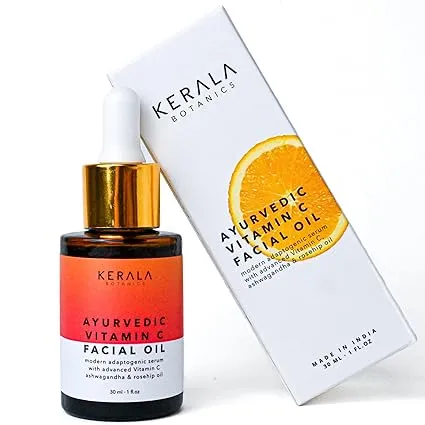
Ayurvedic Vitamin C Face Oil
Kerala Botanics
$49
★★★★☆
If you want the broader case for this kind of simplified approach, we laid it out fully in the 3-in-1 minimalist oil routine.
So — Useful or Not?
Both, honestly, depending entirely on how you use it.
Worth using: the professional-grade imaging at a dermatology office (like VISIA), used alongside an actual trained provider interpreting it. Tracking your own progress over months with a consistent app, same lighting, same time of day, as one data point among others. Treat the score as a photo, not a verdict.
Worth skipping, or at least heavily discounting: any in-store scan that ends with a hard product recommendation on the spot, any app result that spikes your anxiety more than your curiosity, and anything that asks for an account and your photo before it’ll even show you results. And if you have deeper skin, know that the “severity” numbers you’re getting may simply be less accurate, full stop.
For more on telling the difference between a real clinical claim and a marketing one, our piece on reading a skincare claim is a good companion to this. And if filtered, flattering camera results have ever made you second-guess what your skin actually looks like without software smoothing it, filter fatigue covers that specific flavor of confusion.
Putting It All Together
AI skin analysis isn’t fake, exactly. The underlying computer vision is real, and some of what it measures — texture, visible redness, surface pigmentation — is legitimately useful, especially tracked over time. But almost none of these tools were built primarily to inform you. They were built to convert you, and the “concerns” they surface have a funny habit of matching whatever’s on the shelf behind the kiosk.
Use the scan. Don’t fear the scan. Just don’t let a percentage on a tablet decide your whole routine, and definitely don’t hand over your face data without checking where it’s going. Your skin doesn’t need an algorithm’s permission to be fine the way it is — it needs consistent basics, sun protection, and maybe one good multitasking product instead of the seven the app just suggested.